
How to rent
4. Payment Process (Mandatory)
Surfboard Rental Payment
The rental fee must be paid through one of our official platforms:
🌐 Madeira Surfing Website
🔗 Official Linktree
On these platforms, you can select your rental duration and complete payment securely by card.
Security Deposit
A refundable security deposit is required:
- €250 for standard surfboards
- €350 for Pyzel surfboards
The deposit:
- Must be paid before access is granted
- Covers loss, theft, or damage
- Is refunded after equipment inspection
⚠️ If the equipment is returned damaged, part or all of the deposit may be retained.
5. Container Access & Equipment Collection
Step 1 – Receive Your Container Access Code
After both payments have been successfully confirmed (rental fee and security deposit), you will automatically receive an email containing:
🔐 Your temporary container access code.
⚠️ The access code is valid for 30 minutes only after payment. Once this period expires, the code is automatically deactivated.
For this reason, please only complete the rental process when you are standing in front of the container and ready to collect the equipment.
⚠️ Please check your Inbox, Spam/Junk and Promotions folders.
Step 2 – Equipment Collection
Inside the container you will find:
- Surfboard
- Leash
- Fins
- Wetsuit (if rented)
- Surf Boots (if rented)
- Helmet (if rented)
- wax (if rented)
- Car surf Rack (if rented)
- Car keys Locker (if rented)
Step 3 – Mandatory Surfboard Inspection
Before using the equipment, you must complete the Mandatory Surfboard Inspection Form.
The inspection requires:
📸 1 photo of the complete top side (deck)
📸 1 photo of the complete bottom side
📸 Photos of any existing damage (if applicable)
📸 Additional detail photos (if you see any damage)
Photo Upload Limit
⚠️ Please note: Each photo uploaded must not exceed 10 MB in size.
💡 Problems submitting the form because a photo is larger than 10 MB?
Take a screenshot of each photo on your phone and upload the screenshots instead. Screenshots have a lower resolution, so the form will submit normally.
If you do this, please write in the comments / damage field of the inspection form: “Photos uploaded as screenshots (low resolution).” Then send the original high-resolution photos via WhatsApp: +351 963 269 028, together with your reservation number.
⚠️ The inspection must be completed before using the equipment.
⚠️ Before removing any equipment,
Pre-Existing Damage
If you notice any damage or defect on the equipment, you must inform us before using it.
Using equipment that has visible damage or a known defect without reporting it, and then using that damage as a reason to dispute or avoid responsibility for further damage, is a violation of the rental rules.
Any damage that is not reported before use may be considered the responsibility of the renter.
you must be reported immediately.
⚠️ Please if is any visible damage on: Wetsuits, Leash, Boots, Helmet, Fins, Car Surf Rack, Car Keys Locker…
Failure to report pre-existing damage may result in you being held responsible for that damage.
Step 4 – Access the Container
The container access code allows you to:
- Open the container
- Collect your rented equipment
- Close the container securely
⚠️ Important:
The container access code is valid for approximately 30 minutes around your scheduled collection time.
After this period, the code automatically expires.
Step 5 – Receive Equipment Access Codes
Once the inspection form has been successfully submitted, you will automatically receive a second email containing:
🔑 The access codes for all rented equipment.
Examples:
- Surfboard Code
- Wetsuit Code
- Boots Code
- Helmet Code
- Etc…
⚠️ Equipment access codes are only provided after the inspection has been completed successfully.
Surf Wax
Some of our boards may have their wax removed because the existing wax is old and needs to be replaced. Other boards may still have wax on them because it is in good condition.
For this reason, renters are responsible for purchasing their own surf wax and ensuring that the board has enough wax for a safe and enjoyable surf session
CCTV Notice
⚠️ The container is protected by video surveillance for the safety of people and property.
If you do not agree with this condition, please do not proceed with the rental. If payment has already been made, contact the lessor before entering the container and a full refund will be issued.
6. During the Rental
To keep the equipment in good condition:
- Always use the leash
- Do not leave the board under direct sunlight
- Avoid dragging the board over rocks
- Handle all equipment carefully
⚠️ Any damage must be reported immediately.
The equipment remains entirely your responsibility during the rental period.
7. Returning the Equipment
At the end of your rental period, all rented equipment must be returned to the designated return location before the agreed return time.
When returning the equipment, the customer must:
- Return the surfboard, wetsuit and any accessories provided.
- Ensure all equipment is clean and free from excessive sand or debris.
- Return the surfboard and all equipment to the exact same slot from which it was collected.
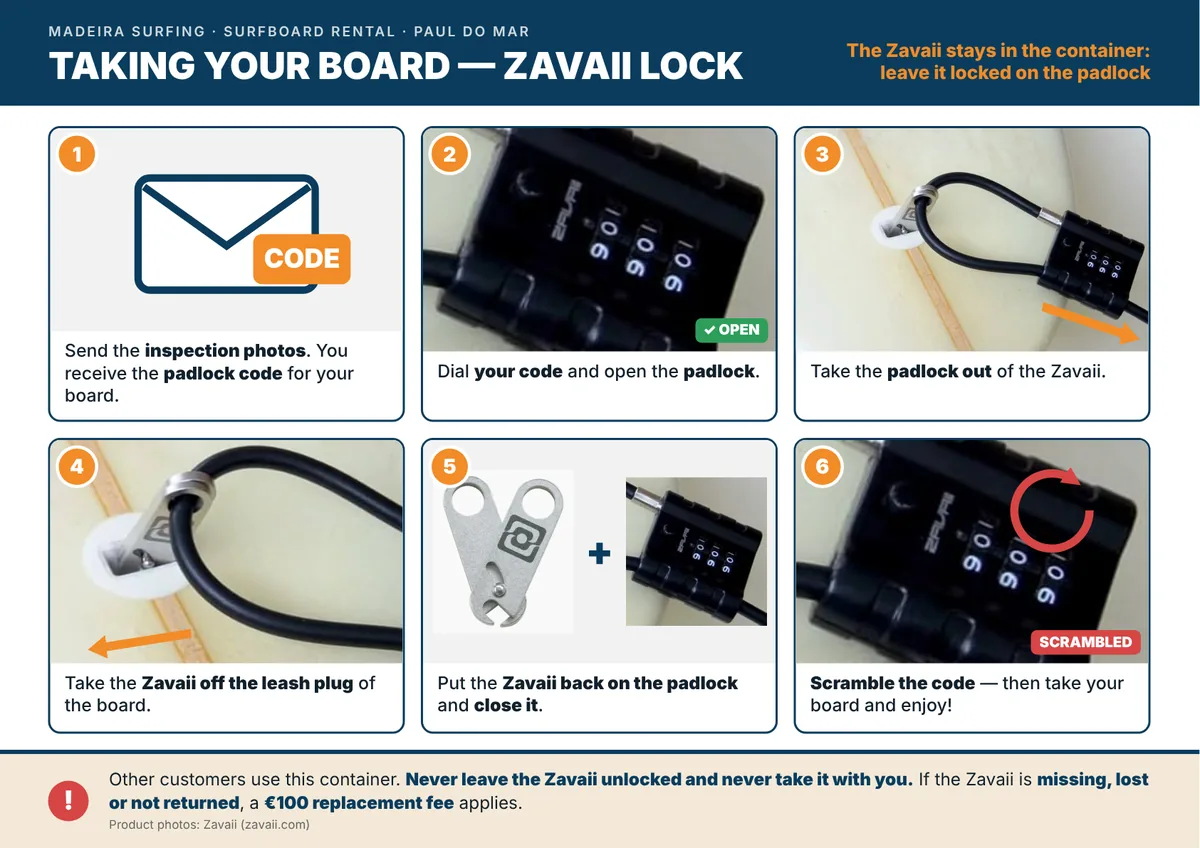
- Secure each item using its designated locking system. This includes properly closing and locking the surfboard with the Zavaii anti-theft system, and securing the wetsuit, boots, fins and any other accessories with their respective padlocks or locking devices.
- Ensure the storage area is properly closed and securely locked before leaving.
- Take a photo confirming that the equipment has been placed in the correct slot and that the padlock and the Zavaii anti-theft system have been properly closed and secured.
- If you have any difficulty returning or securing the equipment, contact Madeira Surfing Rentals immediately for assistance before leaving the location.
- Immediately report any damage, loss or malfunction to Madeira Surfboard Rental.
If the Zavaii anti-theft system is missing, lost or not returned, a replacement fee of €100 will apply.
The customer remains responsible for the rented equipment until it has been correctly returned, secured and all locking devices have been properly reattached.
Failure to return the equipment on time, to secure the equipment correctly, or to lock the storage area may result in additional charges.
Equipment that is not returned, returned incomplete, improperly secured, or returned in a condition beyond normal wear and tear may be subject to repair or replacement costs.
If the equipment is returned without the appropriate locks or not secured according to the return procedure, Madeira Surfboard Rental reserves the right to charge any resulting costs or losses.
Return Access
The same container access code can be used to return the equipment.
⚠️ The return access code only becomes active approximately 30 minutes before your rental period ends and remains valid for approximately 30 minutes.
Example:
Collection: 10:00 AM
1-Day Rental: 24 Hours
Return: 10:00 AM the following day
The container code will only work around the scheduled return time.
After the validity period expires, access may no longer be available.
Equipment Inspection
The equipment will be inspected within approximately 8 hours after return.
✅ If everything is returned in good condition, your security deposit will be refunded.
⚠️ If damage, loss, misuse, or missing equipment is identified, responsibility and costs will be assessed before the deposit is returned.
Important Information
- Rentals are available to adults or minors accompanied by a responsible adult.
- Customers are fully responsible for the equipment during the rental period.
- Loss, theft, or severe damage may result in additional charges.
- Access codes are personal and must not be shared.
- Equipment codes are only provided after successful completion of the mandatory inspection.
- Container access codes are time-limited and automatically expire.
- Entry into the container is strictly forbidden for anyone who has not rented equipment with us.
Need Help?
📱 WhatsApp: +351 963 269 028
📸 Instagram / Facebook
🌐 Madeira Surfing
🌊 Madeira Surfing – Surf with locals, surf with experience. 🤙